Direct Download
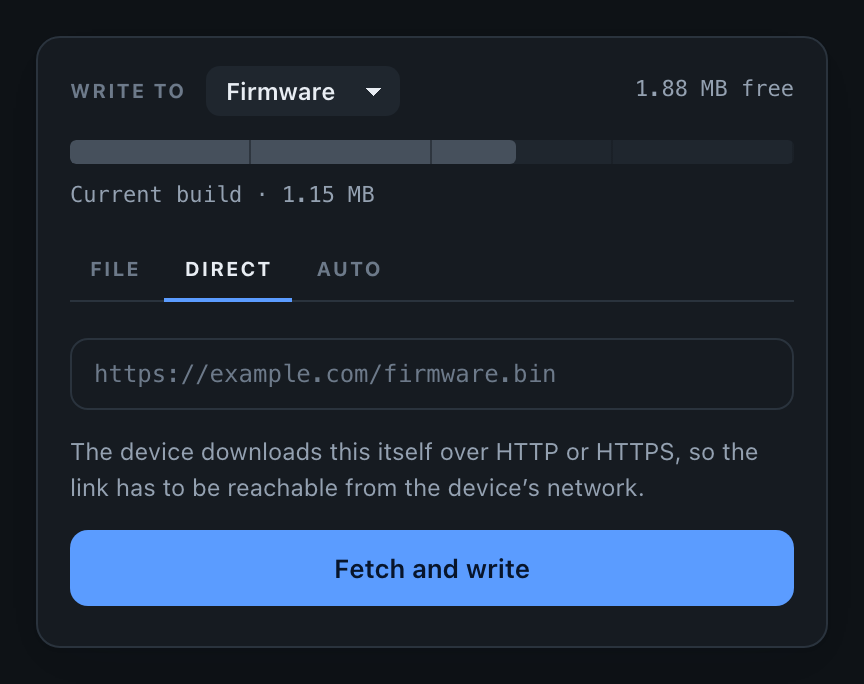
One of three OTA modes. Normally an OTA update travels twice: once from your build server down to the browser, then again from the browser up to the device. Direct Download removes the middle step. You paste a URL into the portal and the device fetches the firmware itself over HTTP or HTTPS.
That matters when the build is large, when the browser is on a slow connection, or when you simply do not want to keep a tab open for the length of a transfer. Progress still appears in the portal, but the download belongs to the device - it survives you closing the page.
The URL has to point at a raw .bin file and be reachable from the device’s network, not from your laptop. Redirects are followed, so a GitHub release link works.
Using it from the portal
Open the portal, switch to the Direct Download tab, paste the URL and press Fetch and write. The device connects, checks that the image fits the target region, and streams it into flash.
Triggering it from your code
You do not need anyone at the portal. pullFrom() queues the same download from your sketch:
#include <ElegantOTAPro.h>

void setup() {
  // ... your usual setup

  ElegantOTA.begin(&server);
}

void loop() {
  server.handleClient();
  ElegantOTA.loop();   // the download runs from here
}

void installNightlyBuild() {
  ElegantOTA.pullFrom("https://example.com/firmware/nightly.bin");
}
pullFrom() returns immediately. It queues the work and returns true if the device accepted the request, or false if it is busy or the URL is not usable. The transfer itself is driven by ElegantOTA.loop(), a slice at a time, so your sketch keeps running while the download is in flight.
Full signature
bool pullFrom(const char * url,
              OTA_Mode mode = OTA_MODE_FIRMWARE,
const char * md5 = NULL);| Parameter | Meaning |
|---|---|
url | Any http:// or https:// URL pointing at a raw .bin |
mode | OTA_MODE_FIRMWARE (default) or OTA_MODE_FILESYSTEM |
md5 | Optional 32-character digest, verified against what lands in flash |
Passing an md5 is worth the effort. The device compares it to the bytes it actually wrote, so a truncated or corrupted download is rejected instead of installed.
ElegantOTA.pullFrom("https://example.com/firmware/2.1.0.bin",
                    OTA_MODE_FIRMWARE,
                    "6f5902ac237024bdd0c176cb93063dc4");
Watching the download
The same callbacks fire as for a browser upload - onStart, onProgress and onEnd. To tell the two apart, ask where the update came from:
ElegantOTA.onStart([]() {
  if (ElegantOTA.source() == OTA_SOURCE_DIRECT) {
    Serial.println("The device is downloading firmware for itself");
  }
});
You can also poll the state machine directly:
switch (ElegantOTA.state()) {
  case OTA_STATE_IDLE:         break;  // nothing happening
  case OTA_STATE_QUEUED:       break;  // accepted, not started
  case OTA_STATE_CONNECTING:   break;  // opening the connection
  case OTA_STATE_TRANSFERRING: break;  // writing to flash
  case OTA_STATE_SUCCESS:      break;  // written, about to reboot
  case OTA_STATE_FAILED:       break;  // see the portal for the reason
  default: break;
}
HTTPS
https:// URLs work out of the box, but certificates are not verified unless you say otherwise. That protects the transfer from passive eavesdropping, not from someone able to answer in the server’s place.
For anything you would call production, pin the root certificate of the host you download from:
static const char UPDATE_ROOT_CA[] PROGMEM = R"CERT(
-----BEGIN CERTIFICATE-----
... your CA here ...
-----END CERTIFICATE-----
)CERT";

void setup() {
  ElegantOTA.setCACert(UPDATE_ROOT_CA);
  ElegantOTA.begin(&server);
}
Pass NULL to go back to unverified connections. The certificate has to stay in scope for the lifetime of the program - a static or global, as above.
ESP8266 needs a large TLS receive buffer, which costs RAM. If HTTPS downloads fail on an ESP8266 while HTTP works, and free heap is tight, lower ELEGANTOTA_TLS_RX_SIZE (default 16384) or host the .bin over plain HTTP on a network you trust.
Turning it off
All three modes are enabled by default. Anyone who can reach the portal - which means anyone past your authentication - can point the device at a URL of their choosing. If that is not something you want to allow, turn it off:
ElegantOTA.setDirectDownloadMode(false);The tab disappears from the portal and the endpoint refuses requests. pullFrom() is refused too, so re-enable it before calling that from your own code. See Disable Direct Download for the full picture.
Tuning
Two compile-time knobs control how the download behaves. Define them before including the library, or as build flags.
| Directive | Default | Meaning |
|---|---|---|
ELEGANTOTA_PULL_BUDGET | 8192 | Bytes moved per loop() call. Raise it for speed, lower it if your sketch needs the time |
ELEGANTOTA_PULL_TIMEOUT | 10000 | Milliseconds of silence before a stalled download is abandoned |
ELEGANTOTA_ENABLE_REMOTE | 1 | Set to 0 to compile the HTTP client out entirely and reclaim the flash |